Record deletion
Introduced in v14
This feature lets users delete their records within a defined policy, immediately or via a request reviewed by repository's administrators. Administrators can delete records from the administration panel.
Enable
Immediate deletions and deletion requests are independent features and can be enabled separately.
RDM_IMMEDIATE_RECORD_DELETION_ENABLED = True  # default False
RDM_REQUEST_RECORD_DELETION_ENABLED = True  # default False
Configure policies
You can customize rules for record's deletion by implementing your own policy. By default, these are:
RDM_IMMEDIATE_RECORD_DELETION_POLICIES = [GracePeriodPolicy()]  # by owner within 30 days after publication
RDM_REQUEST_RECORD_DELETION_POLICIES = [RequestDeletionPolicy()]  # by owner after the 30 days
To change the default immediate allowed time, set:
RDM_IMMEDIATE_RECORD_DELETION_POLICIES = [GracePeriodPolicy(grace_period=timedelta(days=15))]
You can define your own policies, by implementing a class with these 2 methods:
is_allowed(self, identity, record): Whether the identity is allowed to delete the record.evaluate(self, identity, record): Whether the record meets the conditions to be deleted.
class MyGracePeriodPolicy(BasePolicy):
    def is_allowed(self, identity, record=None):
        # policy evaluated without record context, e.g. to check if the feature is
        # enabled for the current user
        if not record:
            return False
        is_record_owner = identity.user.id == record.parent.access.owned_by.owner_id
        return is_record_owner

    def evaluate(self, identity, record):
        ...
        # evaluate time
        ...
        return ...  # True or False
These policies are independent of permissions; the feature is designed to be highly customizable.
Each type of deletion can have an ordered list of policies. Policies are evaluated in order; the first policy that allows the deletion is applied and recorded in the tombstone.
If your criteria depend on resource type, community membership, or other factors, create a new Policy and add it to the appropriate policy list(s).
Configure modal checklists
The deletion modal can present a checklist to guide users toward alternatives to deleting a record. For example, deletion is usually unnecessary in these situations:
- The user forgot to submit the record to a community before publishing — the record can be added to the community afterwards.
- The user wants to replace a file — files can be replaced by the user after publication (if allowed) or by administrators.
- The user wants to change the DOI — the DOI can be updated by editing the record (if allowed).
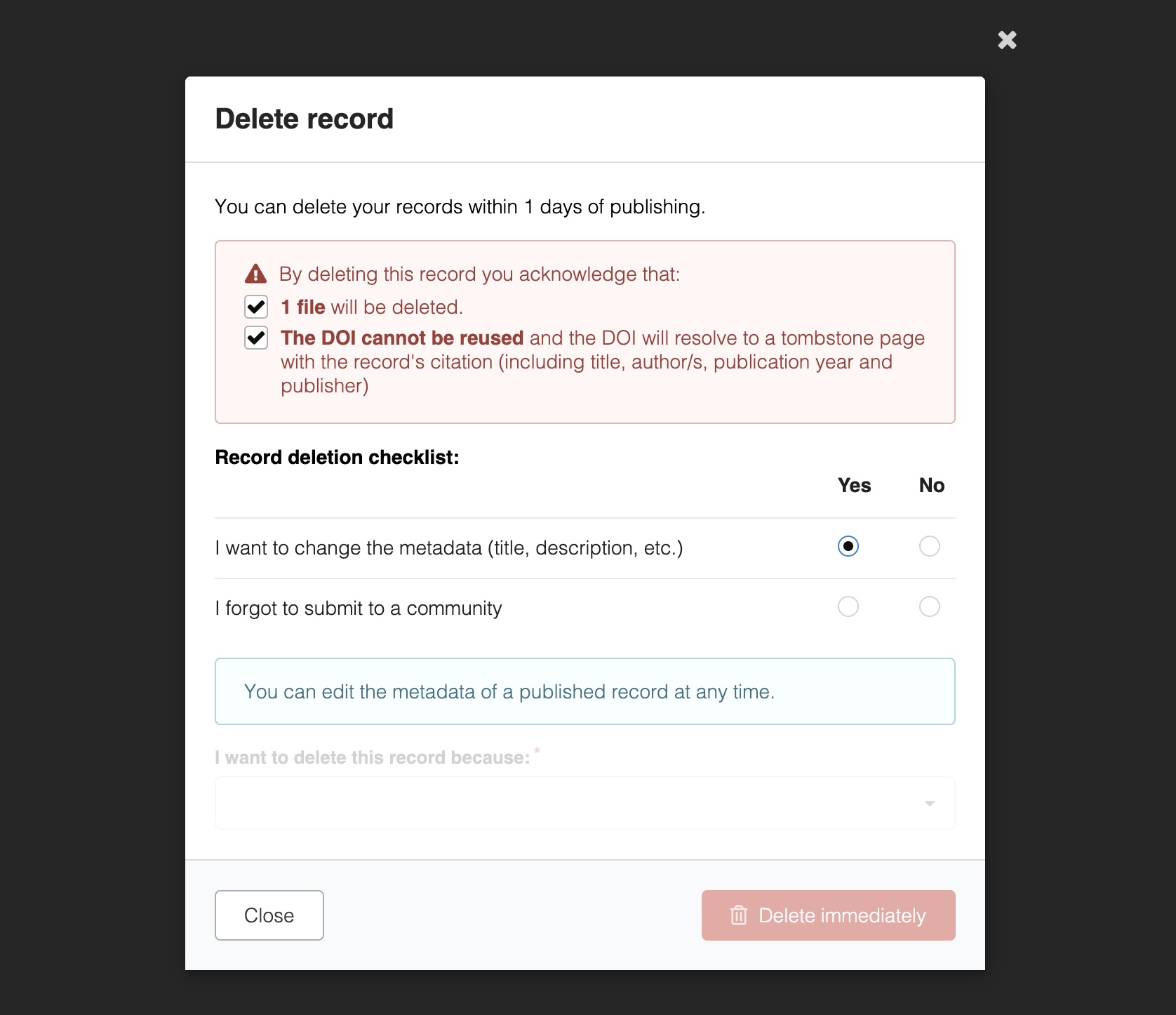
You can configure your checklist in your invenio.cfg:
RDM_IMMEDIATE_RECORD_DELETION_CHECKLIST = [
    {
        "label": _("I want to change the metadata (title, description, etc.)"),
        "message": _(
            "You can edit the metadata of a published record at any time."
        ),
    },
    {
        "label": _("I forgot to submit to a community"),
        "message": _(
            "You can submit a published record to a community by going to the "
            "record landing page and selecting the cog in the communities sidebar."
        ),
    },
]
By default, the checklist is disabled:
RDM_REQUEST_RECORD_DELETION_CHECKLIST = []