Collections
Introduced in v13
Collections provide a powerful way to curate and organize records within your InvenioRDM instance. They define sets of records based on search filters and can be organized hierarchically to create meaningful groupings of content.
Updated in v14: Added user interface for collections management in community settings.
Overview
Collections are dynamic query-based groupings of records that automatically include all records matching a specified search filter. They enable you to:
- Organize records thematically - Group records by subject, resource type, funding program, or any metadata field
- Create hierarchical structures - Build nested collections to guide users in browsing records
- Display curated content - Present collections on dedicated pages within communities or globally
Each collection is stored in the database with a search query string that dynamically fetches matching records. This approach ensures collections stay current as new records are added to your repository.
Collections cannot be used to apply access restrictions or permission-based control over their contained records. Instead, use Communities for managing access and edit permissions over records.
Collections are organized within Collection Trees (also called Sections) - hierarchical structures that allow you to create logical groupings and nested relationships. Collection trees serve as the root containers for your collections and can be:
- Community-specific - Scoped to records of a particular community
- Global - Scoped across records of your entire instance
Global collections
Global collections display is not yet implemented in InvenioRDM.
Configuration
Display settings
To enable displaying the communities "Browse" menu entry in your InvenioRDM instance, add to your invenio.cfg:
COMMUNITIES_COLLECTIONS_ENABLED = True
Collection hierarchy limits
You can configure limits for collection hierarchies to maintain good user experience and system performance:
# Maximum depth for collection hierarchies (default: 1)
# Depth 0 = root collections
# Depth 1 = children of root
# Depth 2 = grandchildren
# Setting this to 1 allows 2 levels: root + children only
COMMUNITIES_COLLECTIONS_MAX_DEPTH = 1

# Maximum number of collection trees per community (default: 10)
# Set to 0 for unlimited trees
COMMUNITIES_COLLECTIONS_MAX_TREES = 10

# Maximum number of collections per tree (default: 100)
# This counts all collections in a tree, regardless of depth
# Set to 0 for unlimited collections
COMMUNITIES_COLLECTIONS_MAX_COLLECTIONS_PER_TREE = 100
Access control
By default, collections can be managed by community owners in the settings tab of the community.
Permission customization
You can customize who can manage collections by overriding the permission policy in your instance.
Create or update your custom permission policy (e.g., my_site/permissions.py):
from invenio_communities.permissions import CommunityPermissionPolicy
from invenio_communities.generators import CommunityOwners
from invenio_records_permissions.generators import SystemProcess

class MyCommunitiesPermissionPolicy(CommunityPermissionPolicy):
    """Custom communities permission policy."""

    # Override collections management permissions
    can_manage_collections = [
        CommunityOwners(),
        SystemProcess()
    ]
Then configure your instance to use the custom policy in invenio.cfg:
from my_site.permissions import MyCommunitiesPermissionPolicy

COMMUNITIES_PERMISSION_POLICY = MyCommunitiesPermissionPolicy
Customizing permissions for a specific community
You can use the IfCommunitySlug generator to apply a different collection management permission to specific communities across your instance based on a community's slug. For example, to block collections management for a community with slug physics:
from invenio_communities.permissions import CommunityPermissionPolicy
from invenio_communities.generators import (
    CommunityOwners,
    IfCommunitySlug,
)
from invenio_records_permissions.generators import Disable, SystemProcess

class MyCommunitiesPermissionPolicy(CommunityPermissionPolicy):
    """Custom communities permission policy."""

    can_manage_collections = [
        # Block collections for 'physics' community, allow for others
        IfCommunitySlug(
            slugs=['physics'],  # Community slugs to match
            then_=[Disable()],  # Block everyone for 'physics'
            else_=[CommunityOwners()],  # Allow for others
        ),
        SystemProcess(),  # System always has access
    ]
Then configure your instance to use the custom policy in invenio.cfg:
from my_site.permissions import MyCommunitiesPermissionPolicy

COMMUNITIES_PERMISSION_POLICY = MyCommunitiesPermissionPolicy
Managing collections programmatically
You can also manage collections programmatically via the Python shell or custom scripts. This is useful for bulk operations or automated setup.
Create a collection tree
First, create a collection tree to serve as the root container:
from invenio_collections.api import CollectionTree

COMMUNITY_ID = "<community_id>"  # Replace with your community's UUID

# Create a collection tree for a subjects-based hiearchy
ctree = CollectionTree.create(
    title="Subjects",
    slug="subjects",  # Used in URLs
    community_id=COMMUNITY_ID,  # `None` for global trees
    order=10  # Controls display order (lower numbers appear first)
)
Create top-level collections
Create your first collections within the tree:
from invenio_collections.proxies import current_collections
from invenio_access.permissions import system_identity

collections_service = current_collections.service

# Create a collection for records classified under the "Natural sciences" subject
natural_sciences_col = collections_service.create(
    system_identity,
    COMMUNITY_ID,
    tree_slug="subjects",
    slug="natural-sciences",  # URL slug for the collection
    title="Natural Sciences",  # Displayed title
    query='metadata.subjects.subject:"Natural Sciences"',  # Search filter
    order=10,  # Display order within the tree (lower numbers appear first)
)
# Create another collection under the same tree for the "Social Sciences" subject
social_sciences_col = collections_service.create(
    system_identity,
    COMMUNITY_ID,
    tree_slug="subjects",
    slug="social-sciences",
    title="Social Sciences",
    query='metadata.subjects.subject:"Social Sciences"',
    order=20,
)
Create nested collections
Add two sub-collections to the "Natural Sciences" top-level collection:
math_col = collections_service.add(
    system_identity,
    collection=natural_sciences_col._collection,
    slug="mathematics",  # URL slug for the sub-collection
    title="Mathematics",  # Displayed title
    query='metadata.subjects.subject:"Mathematics"',  # Search filter (will be combined with the parent collection's)
    order=10,  # Display order within the parent collection (lower numbers appear first)
)
compsci_col = collections_service.add(
    system_identity,
    collection=natural_sciences_col._collection,
    slug="computer-science",
    title="Computer and Information Sciences",
    query='metadata.subjects.subject:"Computer and Information Sciences"',
    order=20,
)
You now have a Collection Tree inside the community with the following structure:
- Subjects (tree)
- Natural Sciences (query:
metadata.subjects.subject:"Natural Sciences")- Mathematics (query:
metadata.subjects.subject:"Mathematics") - Computer and Information Sciences (query:
metadata.subjects.subject:"Computer and Information Sciences")
- Mathematics (query:
- Social Sciences (query:
metadata.subjects.subject:"Social Sciences")
- Natural Sciences (query:
Collections hierarchy
Communities can hold multiple Collection Trees, where each of them can hold collections of different levels of nesting.
There is no limitation in the number of nesting levels for collections. We recommend though that you make reasonable use of them to organize your content effectively, keeping in mind the user experience of navigating and discovering content.
Here is an example diagram, of what a community with two collection trees might look like:
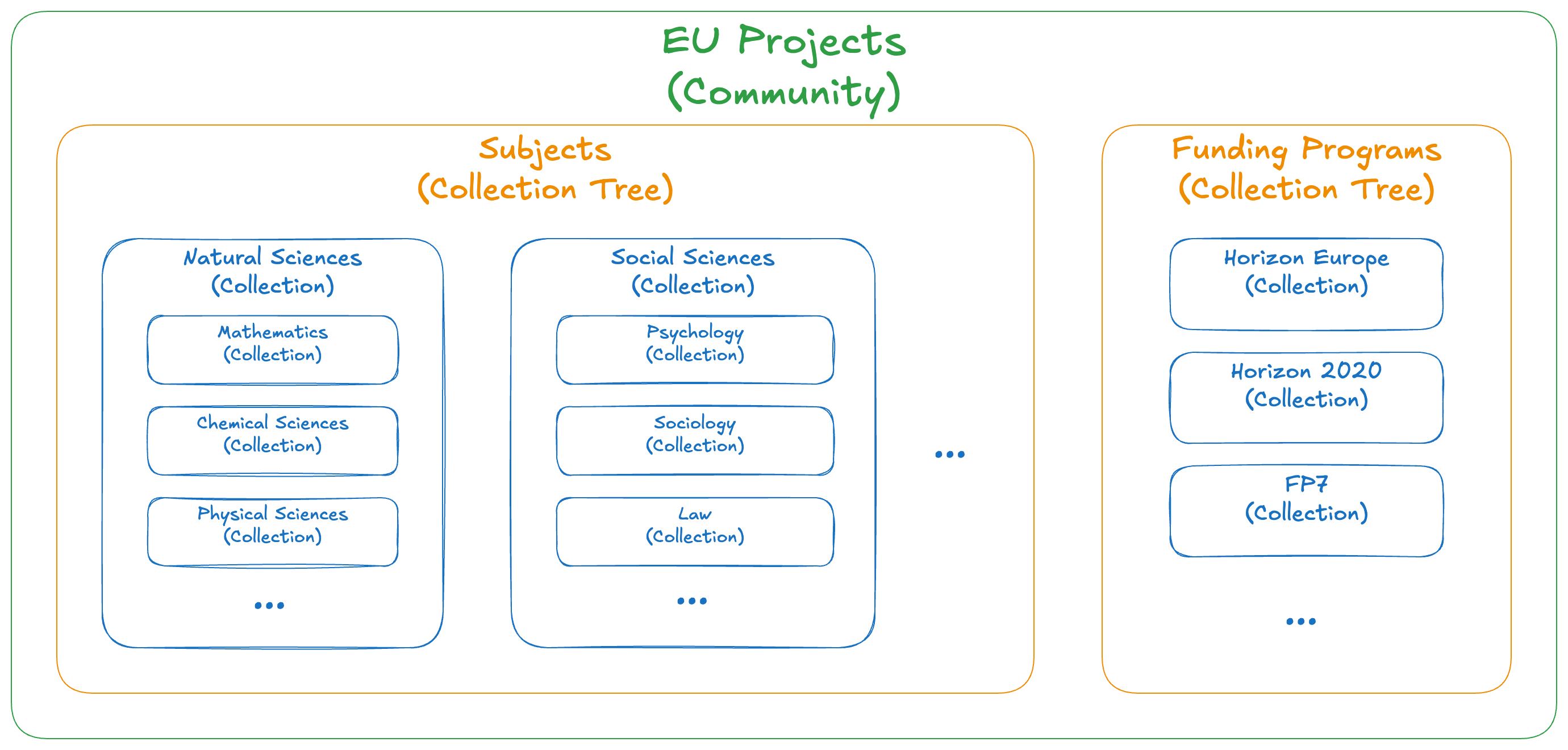
Communities can hold multiple Collection Trees, each of them organizing collections of different nesting levels.
Collections query inheritance
Community-scoped collections include records that are part of the community.
Nested collections automatically inherit their parent's search criteria, combining queries with the AND boolean operator. Child collections show only records that match both their own query and all parent queries. This means that as you go down the hierarchy, the search criteria for record results become more narrow.
Example query inheritance in a "Subjects" hierarchy
Given the following collection hierarchy inside a tree:
- Research Fields
- Natural Sciences (query:
metadata.subjects.subject:"Natural sciences")- Mathematics (query:
metadata.subjects.subject:"Mathematics") - Physical Sciences (query:
metadata.subjects.subject:"Physical sciences")
- Mathematics (query:
- Social Sciences (query:
metadata.subjects.subject:"Social sciences")- Psychology (query:
metadata.subjects.subject:"Psychology")
- Psychology (query:
- Natural Sciences (query:
The effective queries for each collection would be:
- Natural Sciences:
metadata.subjects.subject:"Natural sciences" - Mathematics:
metadata.subjects.subject:"Natural sciences" AND metadata.subjects.subject:"Mathematics" - Physical Sciences:
metadata.subjects.subject:"Natural sciences" AND metadata.subjects.subject:"Physical sciences" - Psychology:
metadata.subjects.subject:"Social sciences" AND metadata.subjects.subject:"Psychology"
If the "Subjects" collection tree is part of a community, then the effective queries also contain a filter for including records that are part of the community (i.e. parent.communities.ids:<community_id>).
Architecture Details
For more technical implementation details, see RFC0079.
Community "Browse" page
Communities with configured collections, feature a browse page that provides an overview of all available Collection Trees and their contained Collections hierarchy, along with the total number of records contained within each collection level. This serves as the main entry point for users to discover and navigate collections within a community.
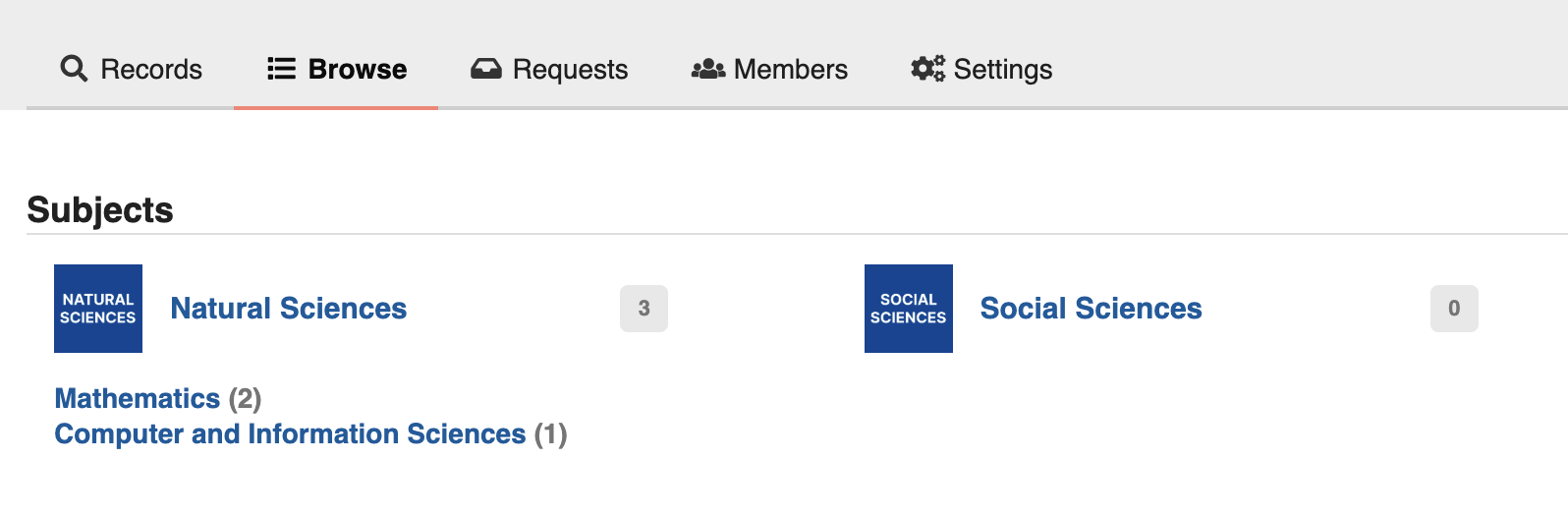
The collection "Browse" page gives users an overview of all available collections organized by collection trees.
The community "Browse" page is accessible at /communities/<community_slug>/browse.
The record totals for each collection level are updated automatically every 1 hour by the invenio_collections.tasks.update_collections_size Celery tasks.
Collection pages
Each Collection has a dedicated page showing its hierarchy and a standard record search page, pre-filtered based on the collection search criteria.
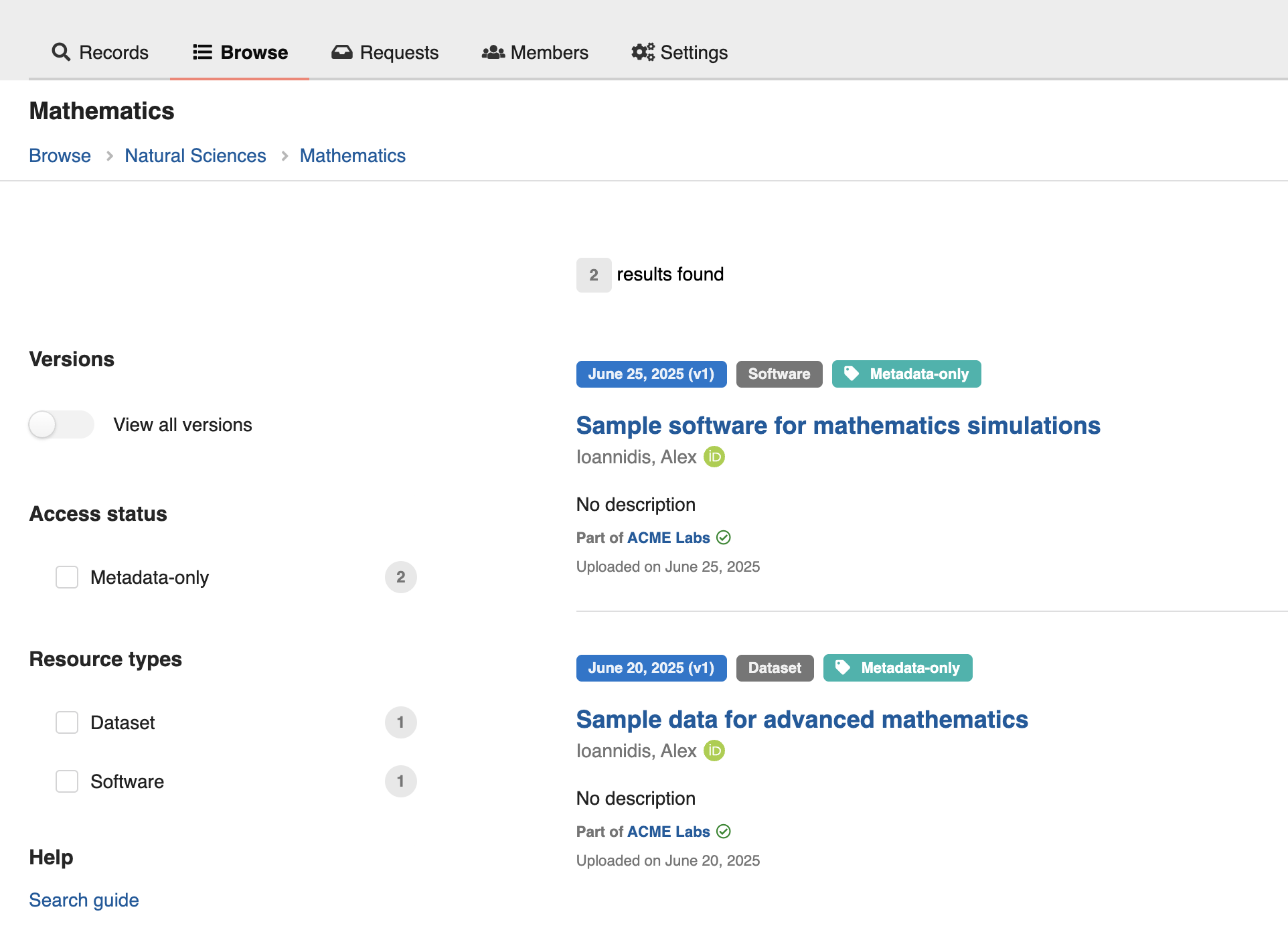
A collection page displays all records matching the search criteria, with breadcrumb navigation showing the collection hierarchy.
Collection pages are accessible at /communities/<community_slug>/collections/<collection_tree>/<collection_slug>.