User storage quota
Introduced in v14
With this feature, users can extend their default storage quota when uploading large files. The following diagram explains how it works:
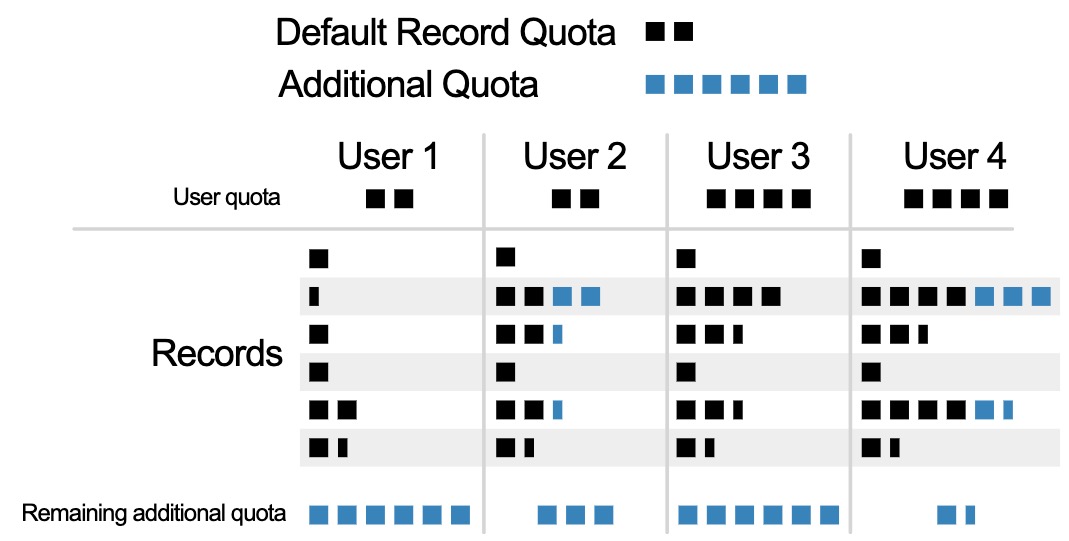
The additional quota is the extra storage that a user can request, and assign it partially or entirely across records.
Enable
To enable this feature, add to your invenio.cfg:
RDM_IMMEDIATE_QUOTA_INCREASE_ENABLED = True

# Enable the default policies
from invenio_rdm_records.services.request_policies import (
    QuotaIncreaseAdminPolicy,
    QuotaIncreasePolicy,
)
RDM_IMMEDIATE_QUOTA_INCREASE_POLICIES = [
    QuotaIncreasePolicy(),
    QuotaIncreaseAdminPolicy(),
]
This will display the storage quota panels to the user in the upload form and profile's settings. See the usage documentation for more information.
Configure additional quota
The default user quota can be configured as described in upload limits documentation page. In your invenio.cfg:
RDM_FILES_DEFAULT_QUOTA_SIZE = 50 * 10**9  # default quota: 50 GB
RDM_FILES_DEFAULT_MAX_ADDITIONAL_QUOTA_SIZE = 20 * 10**9  # additional quota: 20 Gb
Configure policies
You can define your own quota increase policies, by implementing a class with these 2 methods:
is_allowed(self, identity, record): Whether the identity is allowed to manage the quota.evaluate(self, identity, record): Whether the storage can be expanded for the given record.
class MyQuotaPolicy(BasePolicy):

    def is_allowed(self, identity, record=None):
        # policy evaluated without record context, e.g. to check if the feature is
        # enabled for the current user
        if not record:
            return True
        is_record_owner = identity.user.id == record.parent.access.owned_by.owner_id
        return is_record_owner

    def evaluate(self, identity, record):
        ...
        return ...  # True or False

RDM_IMMEDIATE_QUOTA_INCREASE_POLICIES = [
    MyQuotaPolicy(),
    QuotaIncreaseAdminPolicy(),
]
Policies are executed in order and the first one to return True is used as the policy for the record. As such, policies should be specified from most to least specific.