ZIP and container files
Introduced in v14
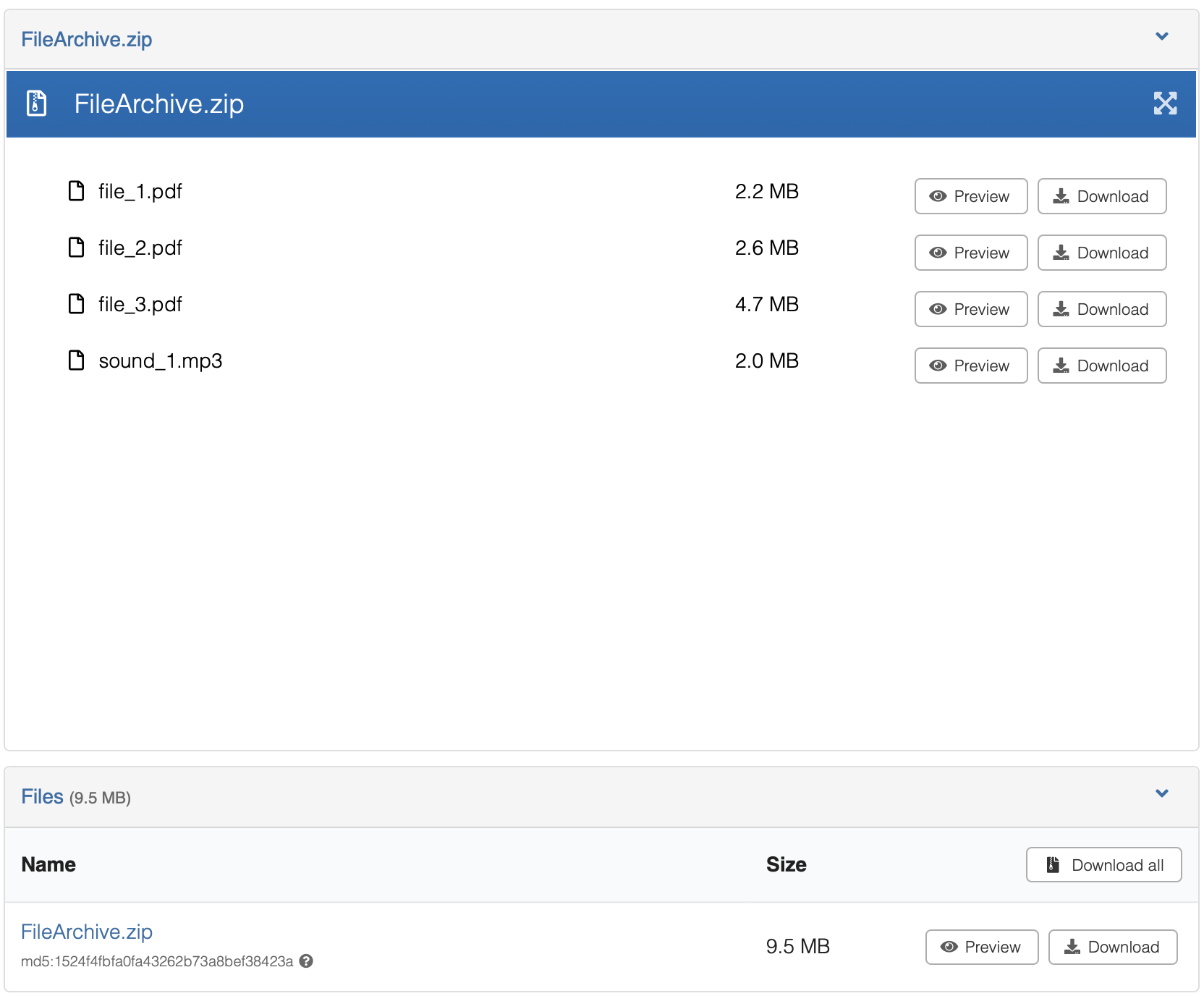
InvenioRDM v14 adds support for ZIP archives as container files: record files that the system understands and can expose. You can browse the contents of a ZIP directly on the record landing page, preview individual files inside the archive, and download specific files or directories without retrieving the entire archive.
Use cases
This feature is particularly useful for large datasets distributed as archives:
-
Border stones dataset: A single ZIP holds thousands of images organized in regional subdirectories. Users can browse the tree structure, preview individual images, and download specific pictures or entire directories without downloading the multi-gigabyte archive.
-
Scientific data collections: Large research datasets (e.g., NetCDF files in the future, simulation outputs) where users need to explore and access specific data files within the logical directory structure.
-
Multi-file publications: Research materials with numerous supporting documents, figures, or supplementary data that are logically organized but should remain accessible individually.
The feature is designed to be extensible. Additional container formats can be supported by implementing the
FileExtractor interface and registering the handler for the relevant extension. See the
architecture documentation for an overview of how the
component model works.
Enabling the ZIP previewer
By default, ZIP files are treated as opaque binary blobs and offered only for download. To enable container browsing
and in-UI preview, replace the original zip previewer with previewable_zip in your PREVIEWER_PREFERENCE list in
invenio.cfg:
PREVIEWER_PREFERENCE = [
    "csv_papaparsejs",
    "pdfjs",
    "iiif",
    "simple_image",
    "json_prismjs",
    "xml_prismjs",
    "mistune",
    "video_videojs",
    "audio_videojs",
    "ipynb",
    "previewable_zip",  # replaces the old "zip" entry
    "txt",
]
Adding previewable_zip tells InvenioRDM to render ZIP files using the container browser UI on the record landing page,
rather than offering a plain download link.
Configuring previews inside archives
A new configuration variable, PREVIEWER_CONTAINER_ITEM_PREFERENCE, holds previewers that work for items contained
inside ZIP files. Currently, all standard previewers except IIIF are supported. IIIF requires additional image server
links that are not available for container items.
This variable follows the same format as PREVIEWER_PREFERENCE but is applied to container items rather than top-level
record files.
PREVIEWER_CONTAINER_ITEM_PREFERENCE = [
    "csv_papaparsejs",
    "pdfjs",
    "simple_image",
    "json_prismjs",
    "xml_prismjs",
    "mistune",
    "video_videojs",
    "audio_videojs",
    "ipynb",
    "zip",
    "txt",
]
ZIP processing limits
The invenio-records-resources module provides configuration variables for ZIP formats and safety limits. These limits are checked when you upload a ZIP file:
| Variable | Default | Description |
|---|---|---|
RECORDS_RESOURCES_ZIP_FORMATS |
[".zip"] |
File extensions treated as ZIP archives by the ZIP extractor. |
RECORDS_RESOURCES_ZIP_MAX_LISTING_ENTRIES |
1000 |
Maximum entries returned in a single listing response. Listings are truncated beyond this limit. |
RECORDS_RESOURCES_ZIP_MAX_ENTRIES |
10000 |
Maximum total entries allowed in a ZIP archive. Archives exceeding this limit cannot be listed or extracted via the API. |
RECORDS_RESOURCES_ZIP_MAX_TOTAL_UNCOMPRESSED |
524288000 |
Maximum total uncompressed size of all entries, in bytes (500 MB). |
RECORDS_RESOURCES_ZIP_MAX_HEADER_SIZE |
65536 |
Maximum size of the ZIP central directory preloaded into memory, in bytes (64 KB). |
RECORDS_RESOURCES_ZIP_MAX_RATIO |
200.0 |
Maximum allowed compression ratio (uncompressed / compressed size). Protects against ZIP bomb attacks. |
RECORDS_RESOURCES_EXTRACTED_STREAM_CHUNK_SIZE |
65536 |
Chunk size in bytes used when streaming extracted content (64 KB). |
RECORDS_RESOURCES_ARCHIVE_DOWNLOAD_MAX_SIZE |
None |
Maximum total file size (bytes) for archive download. None disables the cap. |
Override any of these in invenio.cfg:
RECORDS_RESOURCES_ZIP_MAX_LISTING_ENTRIES = 500
RECORDS_RESOURCES_ZIP_MAX_ENTRIES = 5000
RECORDS_RESOURCES_ZIP_MAX_TOTAL_UNCOMPRESSED = 200 * 1024 * 1024  # 200 MB
RECORDS_RESOURCES_ZIP_MAX_HEADER_SIZE = 128 * 1024  # 128 KB
RECORDS_RESOURCES_ZIP_MAX_RATIO = 100.0
RECORDS_RESOURCES_EXTRACTED_STREAM_CHUNK_SIZE = 128 * 1024  # 128 KB
Browse ZIP contents in the UI
When you upload a ZIP file and enable the previewable_zip previewer, you see:
- Hierarchical tree view: A navigation pane showing the directory structure and files inside the archive
- Preview buttons: Individual files can be previewed using the appropriate previewer (images, PDFs, notebooks, etc.)
- Download buttons: Files can be downloaded individually without extracting the entire archive
- Directory downloads: Directories can be downloaded as a new ZIP archive generated on-the-fly
The previewer uses the BroadcastChannel API to communicate between the tree view and the preview iframe for a seamless browsing experience.
Supported formats and extensibility
By default, files with extensions listed in the RECORDS_RESOURCES_ZIP_FORMATS configuration (default: [".zip"]) are automatically processed as ZIP containers.
Support for additional container formats can be added by implementing the FileExtractor interface in
invenio-records-resources and registering it for the relevant file extension. See the
architecture documentation for details.
Future container formats under consideration include:
- NetCDF: For multidimensional scientific data with logical sections
- TAR/TAR.GZ: For general-purpose archive support
- WACZ/WARC: For web archives (already supported via a separate previewer)